• Skip to primary navigation
  • Skip to main content
  • Skip to primary sidebar

Jackie Van Nice

E-Learning Goodness by Jackie Van Nice

  • Home
  • About
  • Blog
  • Portfolio
    • Articulate’s ELH Challenges
    • Sales Mobility Software
    • Product Sales
    • Sexual Harassment
    • Code of Conduct
  • Freebies
    • Free Storyline Templates
    • Free PowerPoint Templates
    • Free Images
    • Freelancing Tips
    • Free Resources to Help Get Started in eLearning
  • Work With Me
  • Contact

E-Learning Design

“How Did You Get Started as a Freelancer?”

March 7, 2014 By Jackie Van Nice 4 Comments

The Good Life“How did you get started as a freelancer?” is the most common question I’ve gotten in the last 10 years, and it’s a great one.

There are an infinite number of ways you can get started, and everyone’s story is different. But in case it helps you, or any fledgling freelancers you may know, here’s how I got started and how I continue to build.

My Sneaky Plan

I knew a year or two before taking the plunge that I couldn’t take being an employee anymore. At the time, I was a software and training consultant on the road.

I opted to skip all of the usual fretting and worrying about how to start a new business, how to keep money coming in without a regular paycheck, how to reposition myself in the marketplace, and how to find new clients. Fear and worry are a waste of time. I took the quickest route I could think of.

My brilliant idea was to pick one potential client and sneak up on them. And that’s what I did.

Client #1: They Thought They Were Getting an Intern

I started by finding a certificate program at a local college that included an internship requirement. It was a mostly-online program that took a little over a year, and I completed it in my spare time while traveling for work. I already had plenty of degrees and certificates and experience, so I didn’t need the classes or the certificate. They were fine, but not necessary. The key was the internship.

My strategy was to leverage my well-connected instructors to get into the door of an unsuspecting company that thought it was just getting a contract, freelance intern.

It worked like a charm. As soon as I was approved to find an internship, which was my responsibility to find, I put just one feeler into my network asking for what I wanted. And a connection of one of those well-connected instructors came through.

Within two hours I was communicating with a woman looking for an intern to do instructional design work. She immediately took me on at the “intern” rate, but within a week or two, as soon as I’d finished my first assignment, she took me up to the full rate. I contracted from her for several years. All of those projects were for instructor-led-training.

Client #2: I Built It and They Came

When I decided to transition to e-learning I learned as much as I possibly could about it, invested in the tools, learned the tools, and ever-so-casually mentioned to everyone I talked to that I was now doing e-learning. Within three weeks I got a call from a large company asking if I was available for some e-learning projects, and they’ve kept me busy ever since.

Client #3: Expanding Through Volunteering

As busy as I was, I knew I had to develop more clients over time. So I decided to find a large nonprofit and volunteer my services to design and develop whatever e-learning they might need. They were thrilled. Unfortunately, I’m still waiting for their content several years later – but they stay in touch and are very sweet and always thank me for helping and being on the team. They just can’t get it together.

In the meantime, one of their directors moved to a different nonprofit. I made the same volunteer offer at the new place, and she said she’d let me know if they ever decided to start doing e-learning. A few weeks later she called and said they’d decided and that they’d like me to work on contract. They’ve kept me busy for the last few years, too.

Clients #4 and Beyond

Others have become clients just by sitting next to me at a conference and asking for my card, seeing me on LinkedIn and contacting me to do work (this happens quite a bit), and by word of mouth from current clients.

And just today I may have a new one who saw my work in the Articulate E-Learning Heroes Challenges that David Anderson puts together. (The flowers are on the way!)

Relax!You’ll notice I do no advertising or marketing or promotion, other than getting myself out there a little bit and doing some minor networking in ways that are very natural – including some blogging and tweeting. I put far more of my energy into learning more and doing the best work I can, and everything else just flows.

But if you’re a natural salesperson and joyful networker – great! My advice is to stick with the approach that feels most natural for you, because that’s the right one.

So that’s how I got started, and that’s how I keep cruising along.

If you’re a current or future freelancer, does any of that help or give you new ideas?
Filed Under: Working for Yourself Tagged With: E-Learning Design, Freelancing, Instructional Design, Professional Development, Software Training

A Revealing Submenu

March 6, 2014 By Jackie Van Nice 5 Comments

Click Image to Launch Demo

Click Image to Launch Demo

You’ll see this simple-but-fun submenu when I post a portfolio sample for another course – but I like it, so it’s getting its own post.

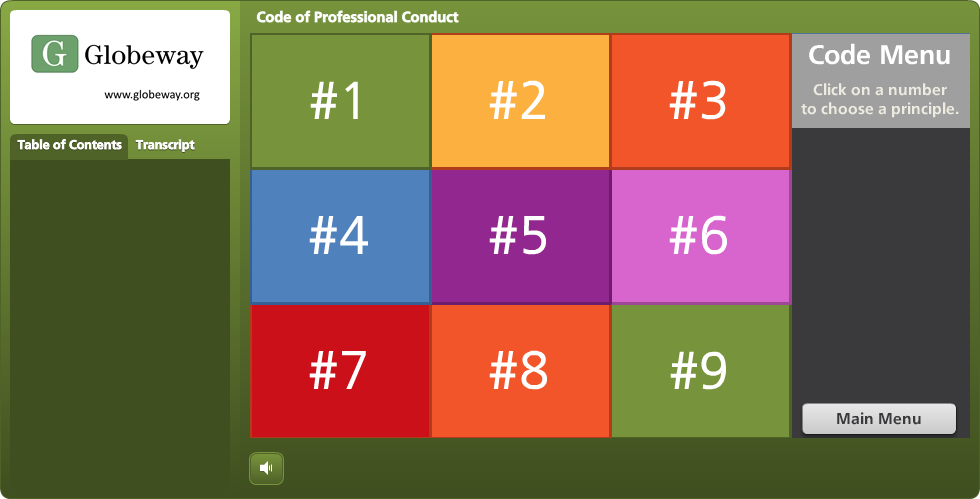
I created it for a subsection covering the nine parts of this organization’s code of conduct. I wanted it to be attractive, responsive, kind of fun, meaningful to the organization, and track which sections had already been visited, while still making each one easy to revisit.

The Idea

I thought it would be fun to have it look a bit like a game board. As the learner clicks on each section, it reveals part of a photo.  Once the photo is fully revealed, you’ve finished that section. I had lots of photos to choose from, but narrowed it down by looking for one that:

  • I could make square to fit the tic-tac-toe/Brady Bunch layout I had in mind,
  • Included people from the same general part of the world that learners would be from,
  • Would show people involved in an organization-related activity, but I didn’t want to reveal what they were doing until the learner had visited almost all nine sections of the code.

The Pieces and Parts

The Grid: I used the bright course color palette to create the nine boxes. Since the organization refers to their Code sections by number, it was appropriate to label them with each section’s number, as opposed to a description or image. Looks more like a game that way, too.

The Side Reveal: So learners could see the name of each Code section before visiting it, I added a trigger to each square in the grid. When you hover over each one, a slide layer shows the section name on the right side.

Side Reveal on Right With Mouse Hovering Over Grid Section #5

Side Reveal on Right With Mouse Hovering Over Grid Section #5

The Photo Reveal: The photo is on the slide master. I created each square as an inserted object on the slide, then keyed the text directly into it. When the learner clicks, the visited state is revealed. The only difference between the normal and the visited state is that I removed the fill color for the square. I still wanted the number to be visible after the square was visited so that it would be easy to go back and revisit the section, and I liked the different-colored outlines that remained after the fill color was gone.

Clicking Reveals a New Piece of the Photo

Clicking Reveals a New Piece of the Photo

See it in Action

This is just a demo of the menu, of course. The section header slides it branches to in the real course take you off into scenarios and all kinds of fun stuff. But you can see the menu sample here.

Thank You, Tim!

By the way, in this sample you’ll briefly see the section header slides I used in the course. These slides are heavily based on Tim Slade’s lovely – and free! – template that he so kindly shared on his site.  Tim’s a gifted and generous designer and you should check out the rest of his site while you’re busy getting the template. (Thanks, Tim!)

Section Header Slide Based on Tim Slade's Design

Section Header Slide Based on Tim Slade’s Design

Filed Under: E-Learning Tagged With: Articulate Storyline, E-Learning Design, Instructional Design, Visual Design

You Can’t Escape Good Design

March 2, 2014 By Jackie Van Nice 2 Comments

You Can't Escape Good Design

Select Image to See Larger

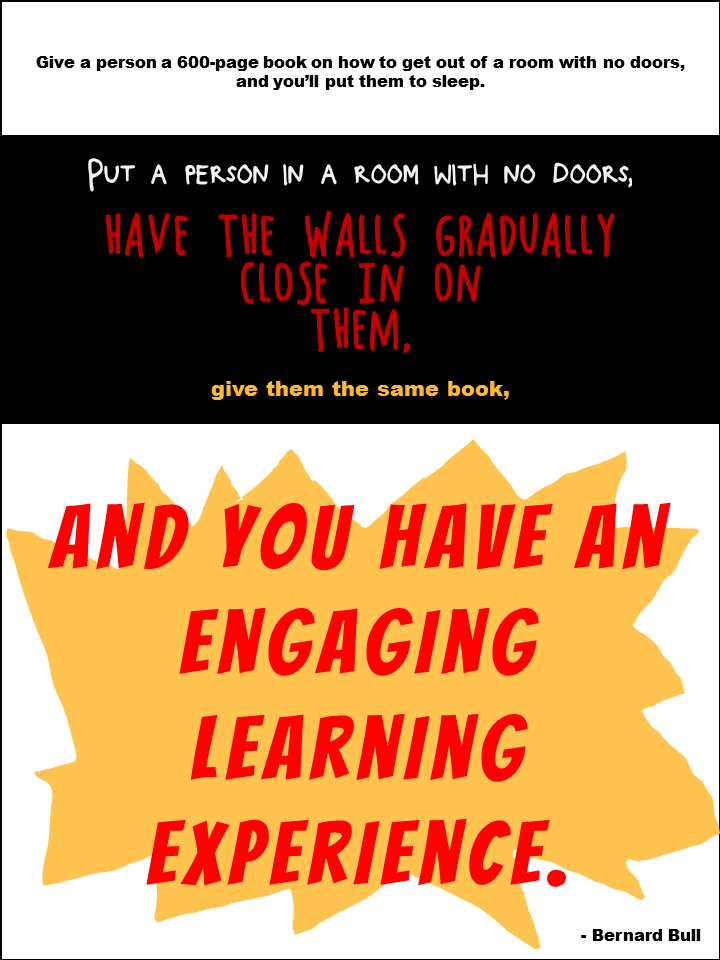
I started this week’s Articulate E-Learning Heroes Challenge by creating this poster, based on a design quote I like. But it’s a general design concept not specific to instructional design, so I thought I’d try for something that feels a little more on-the-nose.

A Bull in an Instructional Design Shop

I found a quote from Bernard Bull that resonated with me, and created the illustrative poster you see here.

The Truth

The funny thing is, throughout this challenge I’ve kept thinking “I don’t refer to quotes; I refer to Michael Allen’s Context, Challenge, Activity, Feedback (CCAF) design model.” It’s not an inspirational quote, but it’s what’s always on my desk and it inspires me every time I design.

Funnily enough, it was only after I’d completed the poster that I realized that this quote is a good example of the CCAF model in action:

The Context: You’re imprisoned and the walls are closing in.
The Challenge: Get out.
The Activity: Use that book I gave you to figure out how.
The Feedback: Either you set yourself free or you subject yourself to the standard walls-closing-in conclusion.

So I was kind of happy about that.

Poster Design

Section 1: Boredom; Lack of Engagement. Clearly I made this as dull as I could. Small black type on a white background to evoke the feel of most 600-page books. The font is Arial Black.

Section 2: The Nefarious Context. Pretty self-explanatory colors and layout. The fonts are Block It Out, Chocolate Windows, and Arial Black.

Section 3: The Big Bang of Engagement. I hand-drew the splashy yellow thing in the background, and the font is, appropriately, Bangers.

The Attribution: Mr. Bull is wearing Arial Black.

Again, I just created it quickly in PowerPoint; though the fuzziness of the Arial Black bugs me. If I can’t take it anymore I’ll put it into Fireworks and convert the text to paths so it’s clearer.

Filed Under: E-Learning Tagged With: CCAF, E-Learning Design, ELHChallenge, Instructional Design, Typography, Visual Design

You Can Quote Me

March 1, 2014 By Jackie Van Nice 2 Comments

Select Image to See Larger

Select Image to See Larger

After running us ragged lately, Articulate’s David Anderson gave us a design challenge that was a relative walk in the park this week. His humble request was to take a favorite instructional design quote and create a poster making good use of typography to express it.

The Quote

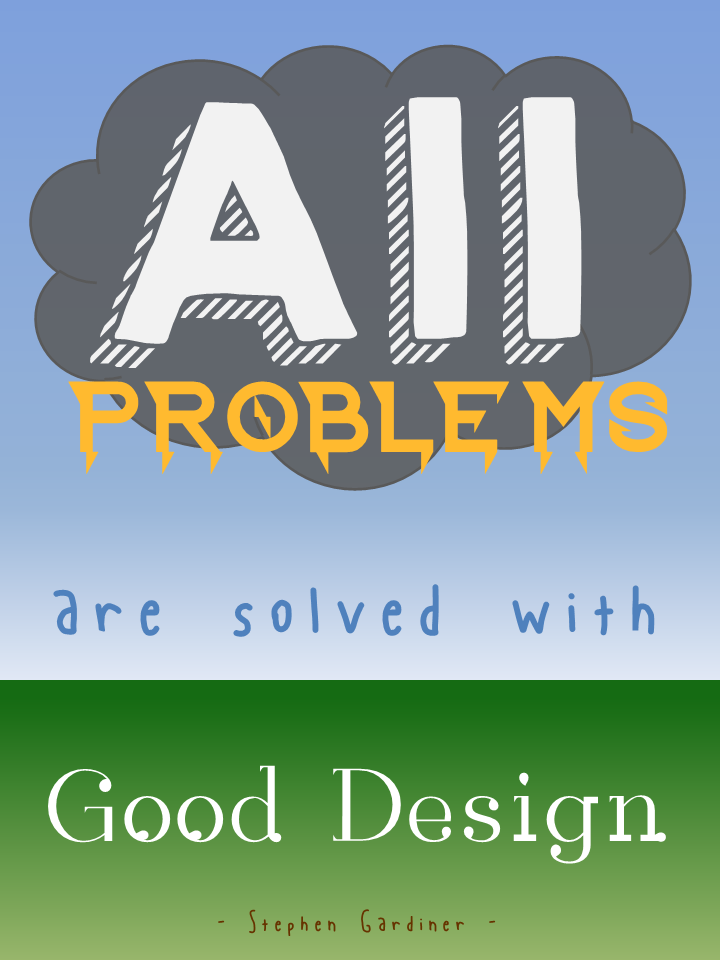
Since I believe that design (instructional and otherwise) rules all (and that solving design problems is the biggest kick there is), I chose architect Stephen Gardiner’s quote “All problems are solved with good design.”

The Idea

I tried to think of a visual expression of “all problems” that could somehow resolve itself in “good design” and, as you can see, pretty quickly came up with a storm-cloud-laden sky giving way to raindrops and then to the new growth of earth below. To keep it quick and easy, I mocked it up in PowerPoint. Since I needed vertical sky-to-ground space, I changed the layout to portrait orientation by going to Design > Slide Orientation > Portrait.

Typography

Fonts: I found all fonts on dafont.com.

“All”: After trying out a good number of cloud-like fonts, I wasn’t happy. Once I placed a basic cloud shape and tried out fonts on top of it, I got happy with, appropriately enough, KG HAPPY. Something about the shadow made me think of storm clouds and rain.

“Problems”: This had to look like lightning, and I got lucky with Ride the Lightning. It was clean enough and bold enough to work, and it gave the visual sense of lightning bolts coming down from the clouds that I wanted.

“Are Solved With”: I wanted these words to have the feel of raindrops, but literal raindrop fonts were just too much. This is Blue Chucks, which the designer says was “inspired by my wonderful shoes”. (Well done, Sir.) I like that his baseline and topline are uneven and it looks sort of loose, like rain. I tried messing with it by puttting each letter into its own text box so that I could make it even more uneven and rain-like, but I wasn’t crazy about that. I was happier letting this nice font be true to itself.

“Good Design”: This one worried me a bit. I wanted it to look like new growth coming from the earth, but the plant-like fonts I found weren’t clean enough. I liked this one because I thought it was suggestive of buds starting to come out of a plant; though oddly enough it’s called Rain.

The Attribution: Well, hopefully Mr. Gardiner would have had a sense of humor about this, because I wanted the font to look like worms deep in the ground helping to start new life. I went with Blue Chucks again for the same wriggly, uneven, yet clean feel. And, of course, using the same font again gives a little more unity to this font-heavy design.

Background

I went with simple blue and green gradients. For the sky, I liked that it looked more like a storm to have the sky darker near the clouds and lighter near the ground, and I thought the green gradient made the ground look a little more alive – worms and all.

The Result

Here it is, full-size.

Filed Under: E-Learning Tagged With: E-Learning Design, ELHChallenge, Instructional Design, Typography, Visual Design

At Last! A Drinking Game I Can Win

February 27, 2014 By Jackie Van Nice 10 Comments

At Last! A Drinking Game I Can Win

Select Image to Launch Demo

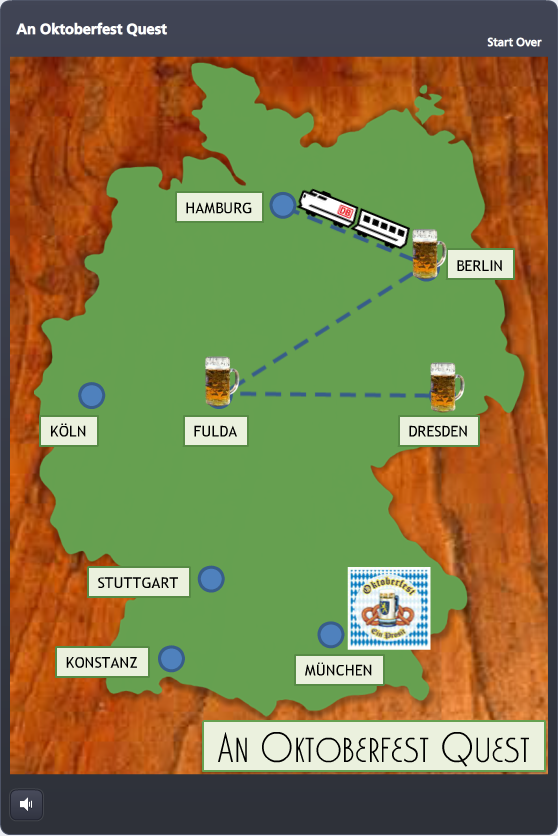
For this week’s Articulate E-Learning Heroes Challenge, David Anderson dared us to create a simple game. (Oh, it’s on.) I created an Oktoberfest Quest game, wherein our hero drinks his way across Germany in order to reach the hallowed beer tents of Oktoberfest in Munich. Somebody had to do it.

A Triumvirate of Inspiration

Timing: David put out the challenge only hours after I’d participated in the weekly #lrnchat discussion on Twitter. Everyone was terribly serious as they discussed how to work collaboratively in groups – until someone brought up beer as a motivational tool. Well, THAT got them dancing in the Twittery aisles, and the whole evening changed. I don’t drink much, but I made a large mental note of what got them engaged: The mere mention of beer.

Topic: As they say, go with what you know. After collecting entirely too many degrees in German, teaching German, and studying, working, and living in Germany – I thought to myself: “maaaaaybe something German…?”

Potential Game Features: I wanted to focus on designing a game board and some sort of progress meter. Since a map of Germany seemed like a natural game board, and a giant Maßkrug slowly filling with beer seemed like an outstanding progress meter, I decided to try those.

Maßkrug

Maßkrug

Design

Since my primary elements, the map of Germany and the Maßkrug, were better suited to a portrait orientation, I flipped the standard Storyline layout so they could inhabit the full screen.

Once I decided to use the game to teach German dining customs, I put a wooden background underneath the map to evoke the feel of a restaurant table, and the checkered tablecloth behind the Maßkrug for the same reason.

I also knew that sound effects would be critical, especially for filling the Maßkrug. I got lucky and found some evocative ones.

Progress

There are two measures of progress: linear progress on the map, and liquidy beer progress in the Maßkrug.

Linear Progress

Linear Progress

Linear Progress: I thought a little Krug at each completed stop on the map would be a good tracker, and moving by train would make it feel like you’re making game progress, and also evoke the sense of traveling through Germany.

At each stop I used a zoom region to zoom in tightly on the city, and then an immediate “Box Out” transition on the following question slide so that, together, it would feel a bit like you’re zooming from the macro map to the micro restaurant where our protagonist needs some help. 

Beer Progress: Every time you answer a question correctly, the Maßkrug fills up a little more. By also using it to briefly recap the teaching point, it doubles as a bit of learning reinforcement.
And speaking of learning stuff, I chose to make it an all-or-nothing game. You’re required to answer each question correctly in order to go forward. One wrong answer and you’re back in Dresden waiting for the train.

Beer Progress

Beer Progress

I credit Michael Allen with this torture. I saw a banking example of his where you decide whether or not to approve a series of checks for payment. One wrong decision, and you’re back to check one. It ticks you off just enough that you get determined to beat the stupid thing, and while you’re at it, you learn the principles being taught.

The Big Finish

I won’t spoil it for you, but it’s kind of awesome.

Play It

My Oktoberfest Quest game is here, but you should also check out the other creative, amazing, and beautiful game ideas posted by others in the comments section of David’s original post here.

Update! Free Template Now Available

Since creating this, I’ve designed a free Storyline template of this game and done some videos to help you customize your own. All the scoop you need is right here!

Filed Under: E-Learning Tagged With: Articulate Storyline, Audio, Characters, Community, Context, E-Learning Design, ELHChallenge, Free Download, Games, German, Instructional Design, Languages, Motivation, Show Your Work

  • « Go to Previous Page
  • Go to page 1
  • Interim pages omitted …
  • Go to page 19
  • Go to page 20
  • Go to page 21
  • Go to page 22
  • Go to Next Page »

Primary Sidebar

Welcome!

I’m an award-winning instructional designer and proud Articulate Super Hero who creates e-learning for large organizations. I blog to explain my design process, share tips and tricks, and help others succeed. I hope you enjoy my refreshing gallery of e-learning goodness!

  • View jackietrains’s profile on Instagram
  • View jackievannice’s profile on LinkedIn

Tags

Articulate 360 Articulate Rise Articulate Storyline Articulate Studio Audio Avatars CCAF Characters Community Context Design Makeover Dials Drag & Drop E-Learning Design ELHChallenge Emotional Engagement Free Download Freelancing Games German Glossary Instructional Design Languages Makeover Menu Mobile Motivation Pantone Portfolio PowerPoint Professional Development Quick Reference Quizzes Sales Training Scenarios Show Your Work Software Training Storyline 360 Tables Technical Training Templates Typography Video Visual Design Voiceover

Top Posts & Pages

  • Portfolio
    Portfolio
  • Home
    Home
  • Sexual Harassment Training
    Sexual Harassment Training
  • Sales Mobility Software Training
    Sales Mobility Software Training
  • Navigating a Tasty Circular Menu
    Navigating a Tasty Circular Menu
  • Articulate's E-Learning Heroes Challenges
    Articulate's E-Learning Heroes Challenges
  • About
    About
  • Free Visual Storyboard Template
    Free Visual Storyboard Template
  • Free Storyline Templates
    Free Storyline Templates
  • How to Go Full-Screen & Lose the Player in Storyline
    How to Go Full-Screen & Lose the Player in Storyline

Copyright © 2026 Jackie Van Nice and E-Learning Goodness by Jackie Van Nice