• Skip to primary navigation
  • Skip to main content
  • Skip to primary sidebar

Jackie Van Nice

E-Learning Goodness by Jackie Van Nice

  • Home
  • About
  • Blog
  • Portfolio
    • Articulate’s ELH Challenges
    • Sales Mobility Software
    • Product Sales
    • Sexual Harassment
    • Code of Conduct
  • Freebies
    • Free Storyline Templates
    • Free PowerPoint Templates
    • Free Images
    • Freelancing Tips
    • Free Resources to Help Get Started in eLearning
  • Work With Me
  • Contact

Front Slider

Fontcracker Suite: Teaching Typography

September 22, 2014 By Jackie Van Nice 16 Comments

Select Image to Launch Demo

Select Image to Launch Demo

This week’s Articulate challenge is to teach some typography by creating a game or interaction. I dove in – excited that I could finally use Storyline’s new features out in the real world!

The Idea: Motion Paths & Dance

Motion paths are a huge plus in Storyline, so I wanted to feature them. Looking at proper typographic form got me thinking of proper human form, which got me to ballet, which led me to letters dancing to ballet music. Dancing letters using Storyline’s motion paths it would be!
Typography as the Star

Typography as the Star

The Typography

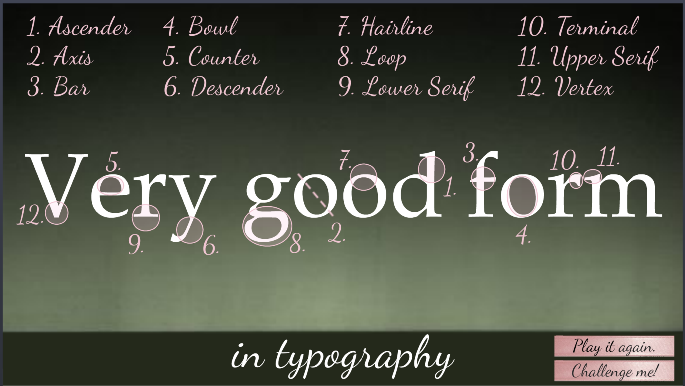
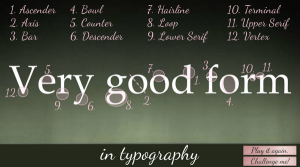
Many explanations of typographic anatomy use the word “Typography” as their example. I chose “very good form” so I could demo the concepts and stick with my theme.

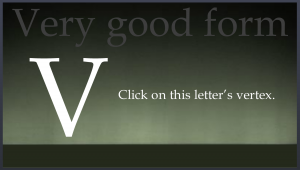
Visual focus is on the typography throughout and it’s used on every screen. It engages the learner, introduces the concepts, acts as a progress meter, provides feedback, and wraps things up. I used one serif font (Book Antiqua) and one script font (Dancing Script). After settling on 12 typography terms to teach, I forged ahead.
Minimal Design

Minimal Design

Minimal Visual Design

Rather than running wild with the theme by adding dancers, Christmas trees, snow, costumes, and scenes from the ballet I kept it simple – guided by the simplicity of the typography.

The main images are a ballet stage as the background and some ballet shoe ribbons. Rather than showing snow, I implied it on the opening screen by having each half of the word “good” fall gently into place.
Learner Control

Learner Control

The Interaction

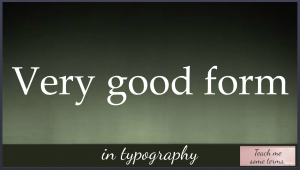
Rather than announcing itself as an interaction where you’ll learn typographic terms, it starts with a fun bit of music and animation that sets the mood, theme, and topic before a small button appears that says “Teach me some terms”. Nothing is forced; you’re enticed to explore.
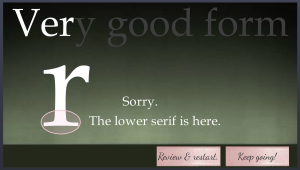
Feedback & Options

Feedback and Options

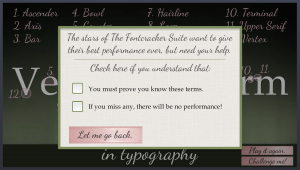
The learner also has enough options and information to feel they’re in control. If you choose “Challenge me!” for example, a message lays out clear expectations by letting you know what’s needed to succeed and gives you your options. Feedback is clear. If you make an incorrect choice you receive correction and can choose to review or continue.
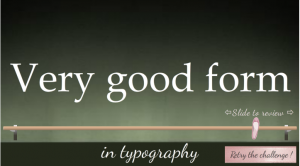
Slider as Ballet Barre for Review

Slider as Ballet Barre for Review

Best Slider Barre None

I used another of my favorite Storyline features – the slider – to create a ballet barre to review terms. (It features a lovely relative motion path, too!) It gives the learner full control and lets them focus on one item at a time.

Enjoy the Show!

If you have your audio ready, here’s the interaction in all of its very good form.
Select Image to Launch Demo

Select Image to Launch Demo

Filed Under: E-Learning, Front Slider Tagged With: Articulate Storyline, Community, E-Learning Design, ELHChallenge, Emotional Engagement, Games, Instructional Design, Show Your Work, Typography

  • « Go to Previous Page
  • Go to page 1
  • Go to page 2

Primary Sidebar

Welcome!

I’m an award-winning instructional designer and proud Articulate Super Hero who creates e-learning for large organizations. I blog to explain my design process, share tips and tricks, and help others succeed. I hope you enjoy my refreshing gallery of e-learning goodness!

  • View jackietrains’s profile on Instagram
  • View jackievannice’s profile on LinkedIn

Tags

Articulate 360 Articulate Rise Articulate Storyline Articulate Studio Audio Avatars CCAF Characters Community Context Design Makeover Dials Drag & Drop E-Learning Design ELHChallenge Emotional Engagement Free Download Freelancing Games German Glossary Instructional Design Languages Makeover Menu Mobile Motivation Pantone Portfolio PowerPoint Professional Development Quick Reference Quizzes Sales Training Scenarios Show Your Work Software Training Storyline 360 Tables Technical Training Templates Typography Video Visual Design Voiceover

Top Posts & Pages

  • Portfolio
    Portfolio
  • Home
    Home
  • Sexual Harassment Training
    Sexual Harassment Training
  • Sales Mobility Software Training
    Sales Mobility Software Training
  • Navigating a Tasty Circular Menu
    Navigating a Tasty Circular Menu
  • Articulate's E-Learning Heroes Challenges
    Articulate's E-Learning Heroes Challenges
  • About
    About
  • Free Visual Storyboard Template
    Free Visual Storyboard Template
  • Free Storyline Templates
    Free Storyline Templates
  • How to Go Full-Screen & Lose the Player in Storyline
    How to Go Full-Screen & Lose the Player in Storyline

Copyright © 2026 Jackie Van Nice and E-Learning Goodness by Jackie Van Nice