Select Image to Launch Demo
This week’s challenge is to share an instructional design cheat sheet, job aid, or reference you use in your work.
The Idea

The Chapman Alliance Study
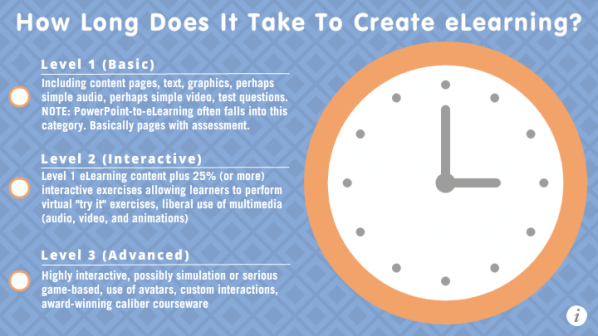
I alllllllllways refer to this Chapman study on how long it takes to create e-learning every time someone approaches me about a project. Since that makes it my most-used reference piece by far, I thought I’d translate it into a zippy little interaction that might even be a tad easier to follow than the original.
The Design
Since the study is focusing on hours, I thought it would be smart to build it around the image of a clock.
Once I found a flat design clock I liked, I added Chapman’s three primary levels of e-learning design to the main slide and used layers to animate the hour estimates for each level onto the clock face itself.
After that I used lots of triggers to make the interaction as intuitive and user-friendly as possible, both visually and functionally, and added a lightboxed slide to provide more detail about the study that also links back to the original.
The Result
As much as I love the original info from Chapman, I’ll no doubt point to this one more. If you’d like to see it in action, you can start estimating your e-learning project hours right here!
I love every piece you write. They are consistently easy to follow and learn from. I’ve given up on learning the software but I keep following your blog because I love to see your amazing projects and how you create the most interesting examples.
Hi Jane! Thank you so much! I’m so sorry if you’ve given up on learning the software, but maybe this just isn’t the right moment in time. At least you know it’s there (and lots of help to learn it is there) whenever you need it. :)
I meant to add – that after seeing your hours estimates, I shouldn’t feel bad that I had over 60 hours into the first draft of a course I created free of charge for an organization. I wanted the practice and feedback. Sadly about the time I was about 75% of the way through my contact quit working there and the next person didn’t even ask to see the course in process. No harm done. It was experience for me.
I’m so sorry that after all of that hard work you didn’t even have the pleasure of seeing it put into service. Nonetheless, major kudos to you for taking the initiative to find an organization to volunteer with. You can’t beat real-world practice when learning this kind of work.
That’s an excellent tool Jackie! It’s very easy to use and addresses a major concern for us designer/developers.
Thanks, Dan! Of course all credit for the info goes to Chapman, but I do think it’s a heck of a lot easier to reference an interaction like this than the original study. I’m glad you’ll be using it, too!
I have to echo Jane in saying that I love all of your work and I have learned a great deal from your site and how you describe the projects you have worked on. I noticed that the Chapman data is from 2010, which is a long time ago technologically speaking. I wonder if you consider the time estimates still accurate. Also, I wonder if the “one finished hour” for an elearning course means it is estimated to take the learner one hour to complete the whole course.
Again, thanks for all you do!
Hi Jenny!
I agree that it would be great to have a more current survey, so if you know of one – please share! These are the stats that my peers and I use all the time, largely because they line up with our personal experience, but also because it’s a straightforward way to show clients what’s involved at different levels of complexity. It’s widely referred to in the field and is the most reliable standard I know.
Yes, I believe the “one finished hour” refers to time to complete the course.
I love this article and interactive elearning! I am considering launching a freelancing elearning career but struggle with communicating how long things take to develop. I need to keep a stopwatch near my desk :). Thanks for this information and for breaking it down into an easy to reference format.
You’re welcome, Becky! By the way, I use the (free) Toggl time tracking app on my phone to easily/instantly keep track of my time by project. Can’t live without it. :)
Hi Jackie, this article provides great insight about eLearning development time and communicating details with Stakeholders and others needed for a practical eLearning product. I am interested to know if the statistics provided support the “only one” instructional designer/developer OR a team of folk. In other words, I am the advanced designer, content builder, graphics creator, proofreader, narrator/audio, tester, and other engaging content, for eLearning 90 minutes in length. So, how does the stats fit for someone like me. Thanks for your insights.
Hi Paulette!
My understanding is that the estimates in the Chapman study account for all of the effort required to produce an hour of elearning at each level of complexity. So if you’re doing 100% of the work involved, that would imply that you would be investing that much of the estimated time.
I am often the sole project manager/ID/media developer/etc, etc., etc. just as you are, and find these time estimates tend to be spot on. Naturally, the only way to verify them for yourself would be to track and evaluate your actual hours for a project, which will then give you invaluable information for estimating future projects, too. I hope that helps!
Hi Jackie,
Thank you for your quick reply! Going forward, I will track my actual hours and refer to the Chapman study as a benchmark. When a deadline is set for project completion, I will work tirelessly to meet the deadline, most, if not all of the time, unrealistic and aggressive completion timelines and deadlines (almost ending up dead, LOL!). Anyways, this helps! Thanks again!
Hi Jackie, I love the interactive tool you developed, very useful! This is by far the best time calculator tool I have seen! One issue I have been having with all of the development time estimators is that they all have the ratio based on 1 hour of training. We all know that days of the one hour training are long gone and microlearning are here to stay (as illustrated in your effective tool). I have asked my team not to develop anything over 20 min which is likely still too long. I asked my team to determine standard development hours on the “ideal” training duration for the current adult leaner mind. I don’t find that the hours ratio to 1 hour always accurately transfer by just dividing by 3 to reach the 20 min because you still have to develop the interface etc. Any chance you could either publish a version of this according to best practice duration or point me to a resource that would accurately reflect this?