• Skip to primary navigation
  • Skip to main content
  • Skip to primary sidebar

Jackie Van Nice

E-Learning Goodness by Jackie Van Nice

  • Home
  • About
  • Blog
  • Portfolio
    • Articulate’s ELH Challenges
    • Sales Mobility Software
    • Product Sales
    • Sexual Harassment
    • Code of Conduct
  • Freebies
    • Free Storyline Templates
    • Free PowerPoint Templates
    • Free Images
    • Freelancing Tips
    • Free Resources to Help Get Started in eLearning
  • Work With Me
  • Contact

Show Your Work: Creating Portfolio Images to Share

August 10, 2014 By Jackie Van Nice 4 Comments

This week’s Articulate challenge is about creating images to showcase your work. After going through the process of producing new work it’s tempting to just move on, but creating shareable images helps build a more visual portfolio and show your peers what you’ve been up to, too.

Main Portfolio Image

First, David Anderson wanted us to create a main portfolio image he could use to link from the challenge to our online portfolios.

Since my website pretty much says it all (who I am, what I do, and what my work looks like), I adapted the basic layout of my site and captures of my work into an image David could use. I also like the idea that anyone clicking on the image will land on exactly what they’d expect to see. Truth in advertising.
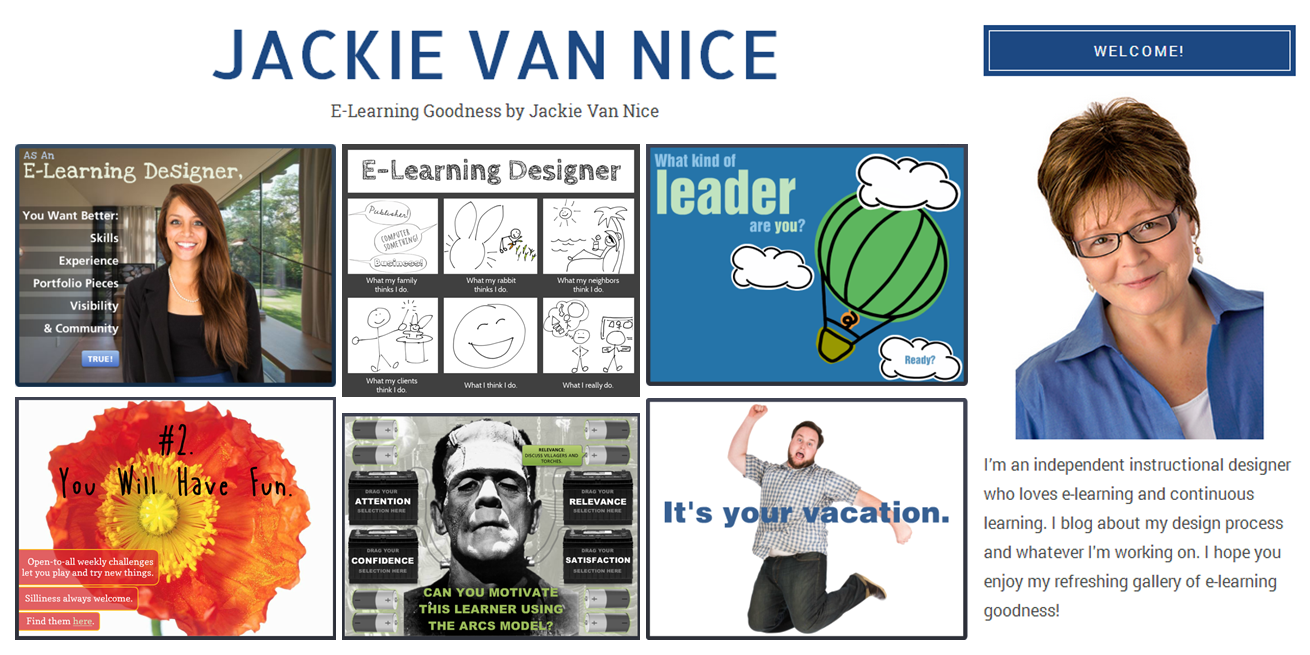
Jackie Van Nice Portfolio

Portfolio Image for the Challenge: Look familiar?

Use this free template! I shared the template I used to create this image with another community member, and they found it so useful I thought I’d offer it as a free download. It’s in PowerPoint, and you’re welcome to grab it right here.

Images for Social Media

The next step was to create the same type of image to share on Twitter, Facebook, and Pinterest. Since each handles images differently, the challenge is to try to get your image to display as you’d like it to. The images I shared on those sites are below.

This will be an ongoing challenge. Between the ever-changing demos I create and the ever-changing sites to share them on, this can only be a work in progress. But the value of figuring it out and doing it well is enormous. Thanks for the challenge, David!

Portfolio Image Posted to Facebook

Portfolio Image Posted to Facebook

Portfolio Image Posted to Twitter

Portfolio Image Posted to Twitter

Portfolio Image I Pinned on Pinterest

Portfolio Image I Pinned on Pinterest

Share this:

  • Share on LinkedIn (Opens in new window) LinkedIn
  • Share on Facebook (Opens in new window) Facebook
  • Share on X (Opens in new window) X
  • Share on Pinterest (Opens in new window) Pinterest
  • Share on Tumblr (Opens in new window) Tumblr
  • Email a link to a friend (Opens in new window) Email
  • Print (Opens in new window) Print
  • More
  • Share on Reddit (Opens in new window) Reddit

Like this:

Like Loading...

Related

Filed Under: Working for Yourself Tagged With: Community, E-Learning Design, ELHChallenge, Free Download, Freelancing, Portfolio, PowerPoint, Professional Development, Show Your Work, Visual Design

Previous Post: « How I Record Audio for E-Learning
Next Post: Call Center Software Training »

Reader Interactions

Comments

  1. Daniel Adeboye says

    August 13, 2014 at 7:23 am

    Hey Jackie…always inspired by your work! Anyway, working on my portfolio page and images for header and social media.
    Can you help me with the size of Facebook images? I don’t seem to see that in the challenge instructions…

    Loading...
    Reply
    • Jackie Van Nice says

      August 13, 2014 at 7:30 am

      Thanks Daniel! Well, you can find the dimensions online, but whatever I found I apparently wasn’t thrilled with, since I ended up just using the exact same image and image size I used for Twitter. Seemed to work, but let me know what you end up doing!

      Loading...
      Reply
      • Daniel Adeboye says

        August 13, 2014 at 10:45 am

        Jackie…thanks. I eventually used an image size I saw online(1200×599), I hope it’s optimized anyway. I created a blog post for my entry!

        Loading...
        Reply
        • Jackie Van Nice says

          August 13, 2014 at 12:57 pm

          That may be what I used too. I thought if Twitter was 2:1 then Facebook could probably handle it too. Good job making it happen!

          Loading...
          Reply

What do you think?Cancel reply

Primary Sidebar

Welcome!

I’m an award-winning instructional designer and proud Articulate Super Hero who creates e-learning for large organizations. I blog to explain my design process, share tips and tricks, and help others succeed. I hope you enjoy my refreshing gallery of e-learning goodness!

  • View jackietrains’s profile on Instagram
  • View jackievannice’s profile on LinkedIn

Tags

Articulate 360 Articulate Rise Articulate Storyline Articulate Studio Audio Avatars CCAF Characters Community Context Design Makeover Dials Drag & Drop E-Learning Design ELHChallenge Emotional Engagement Free Download Freelancing Games German Glossary Instructional Design Languages Makeover Menu Mobile Motivation Pantone Portfolio PowerPoint Professional Development Quick Reference Quizzes Sales Training Scenarios Show Your Work Software Training Storyline 360 Tables Technical Training Templates Typography Video Visual Design Voiceover

Top Posts & Pages

  • Portfolio
    Portfolio
  • Home
    Home
  • Sexual Harassment Training
    Sexual Harassment Training
  • Sales Mobility Software Training
    Sales Mobility Software Training
  • Navigating a Tasty Circular Menu
    Navigating a Tasty Circular Menu
  • Articulate's E-Learning Heroes Challenges
    Articulate's E-Learning Heroes Challenges
  • About
    About
  • Free Visual Storyboard Template
    Free Visual Storyboard Template
  • Free Storyline Templates
    Free Storyline Templates
  • How to Go Full-Screen & Lose the Player in Storyline
    How to Go Full-Screen & Lose the Player in Storyline

Copyright © 2026 Jackie Van Nice and E-Learning Goodness by Jackie Van Nice

%d