• Skip to primary navigation
  • Skip to main content
  • Skip to primary sidebar

Jackie Van Nice

E-Learning Goodness by Jackie Van Nice

  • Home
  • About
  • Blog
  • Portfolio
    • Articulate’s ELH Challenges
    • Sales Mobility Software
    • Product Sales
    • Sexual Harassment
    • Code of Conduct
  • Freebies
    • Free Storyline Templates
    • Free PowerPoint Templates
    • Free Images
    • Freelancing Tips
    • Free Resources to Help Get Started in eLearning
  • Work With Me
  • Contact

Emotional Engagement

Learning to Spend Money the Yummy Way

November 17, 2014 By Jackie Van Nice 12 Comments

Select Image to Launch Demo

Select Image to Launch Demo

This week’s Articulate challenge is to create a learning game for kids. What’s not to like about this one?

Grandma's Got Some Money

Grandma’s Got Some Money

The Idea

The only problem was coming up with an idea. I messed around with math and word games, then starting building a camping game, but wasn’t happy with any of it.

I finally realized that unless the game emulated a situation where a kid really needed to apply some knowledge, I wasn’t going to like it and neither would the kid. This scenario reminds me of my wonderful brother Bryan who was always finding treasures and wondering if he had enough money to buy them, but it applies to any kid – large or small.
Flat, Mobile-Friendly, Kid-Friendly Design

Flat, Mobile-Friendly, Kid-Friendly Design

The Interaction

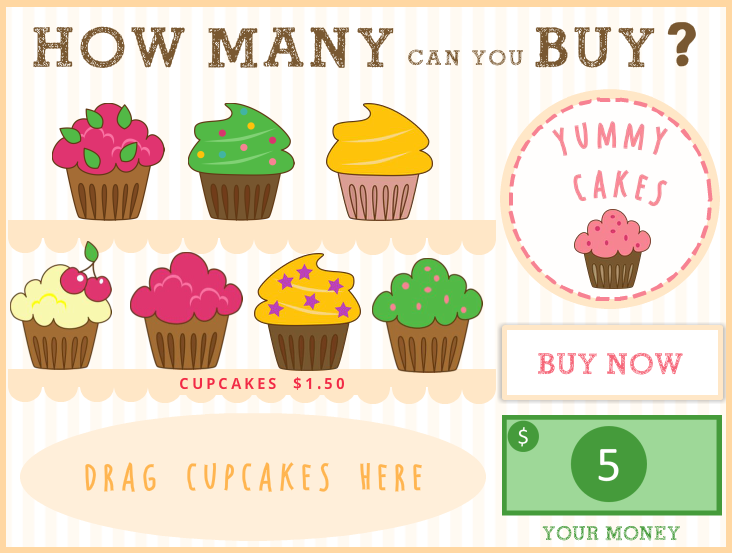
The Intro: I wanted to ease you into the situation rather than unceremoniously drop you at a cupcake shop. Grandma supplies the money and the mission. The rest is up to you.

The Design: I kept the design pretty flat. I also wanted it to be playable on a tablet, so kept it simple and clean. Using a drag-and-drop, avoiding hover states, and keeping images large enough to easily tap and move with fingers were also part of my mobile-friendly plan.

The Challenge: I didn’t want there to be an on-screen calculator that showed how much money would be left after each cupcake was chosen. Those don’t exist in real cupcake shops, so why supply one here?

My Wish List: What I would love to do is supply feedback that goes over the math of what they just spent and ask them how much change they have left. I’d also love to make it so that if they chose to spend a smaller amount – buying just one cupcake, for example – they could save that money and take it with them to the next challenge. I’d want them to go to the movies, a fast food restaurant, an arcade, etc., and be met with different challenges in each location.

Too Much to Mention: There’s lots more that went into this one – from the variables and conditional triggers to the images, fonts, and pictograms – but if I go into all that we’d just be burning daylight, and you need to go buy some cupcakes! (But feel free to ask me questions.)

Go Buy Cupcakes!

Have fun spending Grandma’s money on a little cake and frosting right here.
Select Image to Launch Demo

Select Image to Launch Demo

Filed Under: E-Learning Tagged With: Articulate Storyline, Characters, Community, Context, E-Learning Design, ELHChallenge, Emotional Engagement, Games, Instructional Design, Motivation

Preventing Workplace Violence Holiday-Style!

November 4, 2014 By Jackie Van Nice 12 Comments

Select Image to Launch Demo

Select Image to Launch Demo

Our Protagonist

Our Protagonist

This week David Anderson challenged us to create a scenario about preventing workplace violence.

The Idea

Addressing the topic of violence comes to me about as naturally as learning Hungarian, so I put this challenge aside for awhile.

While organizing files a bit later, I stumbled across these cute-as-a-button holiday images and decided to challenge myself to use them – exactly as they are – for the challenge. The snowman and gingerbread man would be my characters, and I wouldn’t let myself manipulate or change them.

The Scene of the Crime

The Scene of the Crime

The Scenario

Since Christmas trees were part of this set, I opted to have the snowman run a Christmas tree lot and have the gingerbread man pull a heist. The only weapon-like image I had was a hatchet, so it became a hatchet job.

You Make the Decisions

You Make the Decisions

You, as the learner, choose how to respond. In both the positive and negative outcomes you’re given tips to help you successfully cope with the situation before trying it again with different choices, giving you a safe and effective way to learn and practice the concepts.

Try it Out!

Do you know how to handle tough times on a Christmas tree lot? Try it right here and find out! You might even have a little gingerbread-themed fun while you’re at it.

Filed Under: E-Learning Tagged With: Articulate Storyline, Characters, Community, Context, E-Learning Design, ELHChallenge, Emotional Engagement, Instructional Design, Show Your Work

Dating Zombies as a Survival Strategy

October 19, 2014 By Jackie Van Nice 8 Comments

Select Image to Launch Demo

Select Image to Launch Demo

This week’s creepy-yet-practical Articulate challenge is to put together something that will help us prepare for – and survive – the upcoming Zombie Apocalypse. My idea may not have the best success rate, but it’s all I’ve got.

The Idea

Zombie

Zombie

Sticker

Sticker

Inspiration

Inspiration

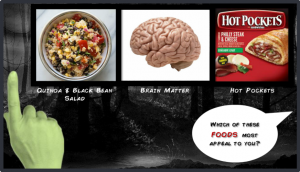
It started with some dollar store scratch-n-sniff zombie stickers. (I haven’t been curious enough to find out what zombies smell like yet.) But I started to notice categories (food, drink) and sketched out an interaction where a perky person was doing zombie market research. When outcomes for that seemed too limited, I came up with the dating idea.

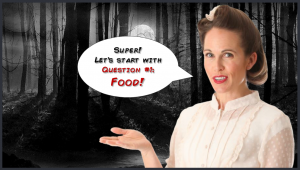
Creepy Setting --- Perky Person

Creepy Setting — Perky Person

I knew contrast would be key. Lovely, safe, familiar things needed to be set in high relief against their opposites; hence the choices for music, fonts, script, people, food, drink, and everything else.

Tough Choices

Tough Choices

The Interaction

Theme

It’s all bad-horror-movie inspired, including the intro with that awesome True Crimes font. Add some of Storyline 2’s new animations and it’s a pretty good title screen.

Slider

This time I filled the thumb with an image of a zombie hand and used no visible track. You slide and release the hand to choose, which seems intuitive. The only downside of using the slide-and-release option was that when I published to HTML5 it treated triggers as though they were part of a while-slider-is-dragged version – so I republished without HTML5.

Options & Outcomes

There are 3 possible outcomes. One based on zombie choices, one based on my own personal choices (largely unlike zombie ones; though lines get blurred in a couple of categories), and one somewhere in between.

Click Image to Launch Demo

Click Image to Launch Demo

Try it Out!

Who’s your perfect match? Give it a try and find out… if you DARE.

Filed Under: E-Learning Tagged With: Articulate Storyline, Characters, Community, Context, E-Learning Design, ELHChallenge, Emotional Engagement, Games, Instructional Design, Show Your Work, Typography

Faces of the Ebola Response

October 12, 2014 By Jackie Van Nice 30 Comments

Select Image to Launch Demo

Select Image to Launch Demo

This week’s Articulate ELH Challenge is to design a learning interaction around the Ebola outbreak. Though I started with a branching scenario about patient triage, it wasn’t resonating with me because it wasn’t what I wanted to say.

The Idea

The Individuals

The Individuals

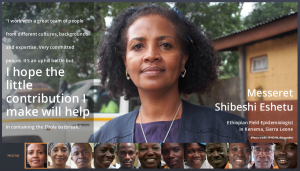
What I wanted to say is that there are people exactly like you and me on the ground who are calmly and quietly taking natural and positive action in response to the situation. This is easy to miss in an unending stream of panicky headlines.

I looked for information and lucked out by finding these profiles from the World Health Organization. Since I couldn’t possibly improve upon the content I simply worked to enhance it by framing it in a way that supports what they’re doing, helps educate people about what’s going on, and possibly motivates them to take action.

The Interaction

The Focus

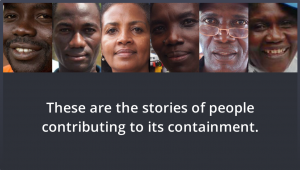
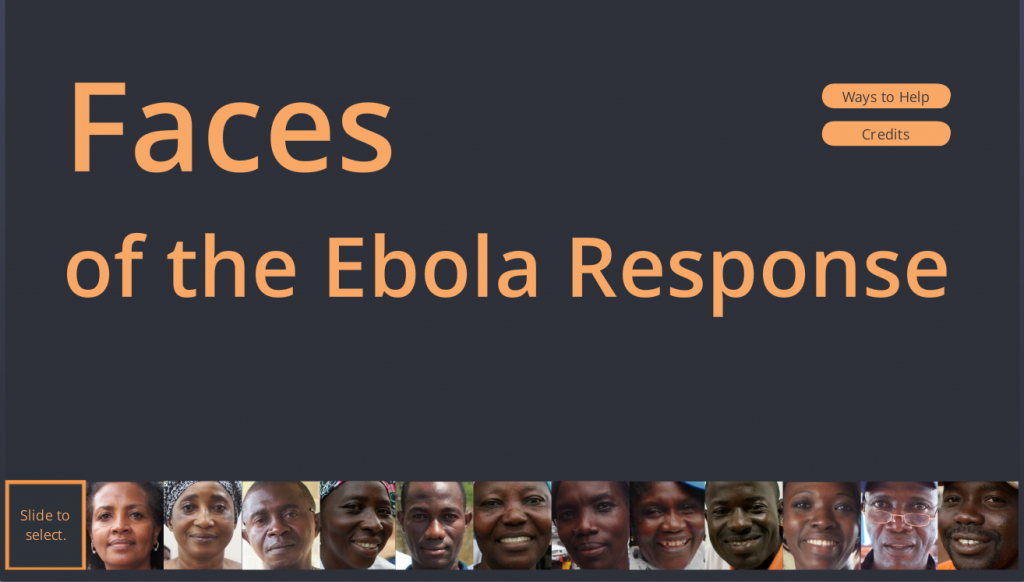
I wanted simplicity, with complete focus on the individuals. It was tempting to have a more elaborate intro that involved maps and background information about the outbreak, but in the end the photographs and related personal stories tell the tale.

A Simple Intro

A Simple Intro

Slider Navigation

Slider Navigation

The Slider

From the start I envisioned a slider with a movable frame you could use to select a person’s image, and was very happy when I figured out how to do it.

It essentially involved making the slider track completely transparent and creating a frame image that I used as a picture fill for the thumb. That plus a whole lot of fine cropping and alignment work – and voilà! – the slider I had imagined. I also made liberal use of other Storyline features including motion paths, built-in animations, and advanced text control.

The Music

Finding music for this was initially quite tough. I could find lots of West African music, but very little of it evoked the mood I was after. Even when I found songs that did, I had no way of knowing if the message being conveyed – whether literally or culturally – would be appropriate, and the topic is simply too sensitive to risk a bad choice.

Fortunately I know a guy who knows his way around djembes and mbiras (that’s a picture from when we were shopping for instruments in Turkey), and he generously offered to let me use some music he wrote and recorded. Many thanks to him for that. I chose the song “Numbers” from a CD of kalimba music he did a few years back since I thought it conveyed a sense of calm, steady progress and it had an opening that worked well for this piece.

Dan Sweigert Getting Musical

Dan Sweigert Getting Musical

See it in Action

If you’d like to see it, make sure you have audio and get ready to be inspired by some remarkable individuals right here.

Select Image to Launch Demo

Select Image to Launch Demo

Filed Under: E-Learning, Front Featured Tagged With: Articulate Storyline, Audio, Community, E-Learning Design, ELHChallenge, Emotional Engagement, Show Your Work

How I Dolled Up Storyline’s Sliders

September 28, 2014 By Jackie Van Nice 20 Comments

Select Image to Launch Demo

Select Image to Launch Demo

If you’re a Storyline fan you probably know its latest release features sliders, and this week’s challenge is to make things slide all over the place.

The Idea

I’d originally used the paper doll try-different-outfits inspiration in a drag and drop challenge at a time I was doing uniform and safety gear training. Revisiting it with sliders sounded like fun, but this time I chucked the serious gear so I could just play with dolls.

The Images

The Images

Visual Design

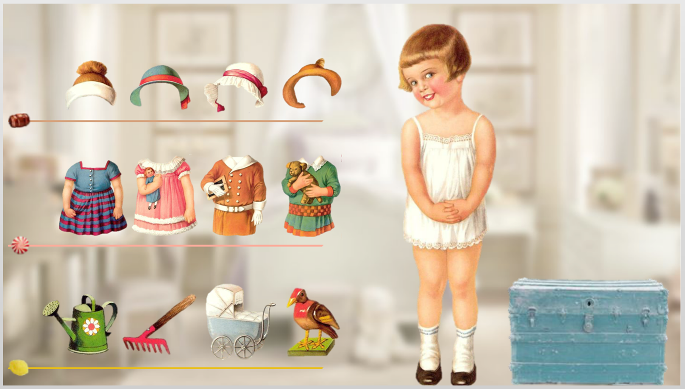
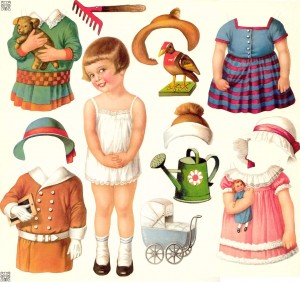
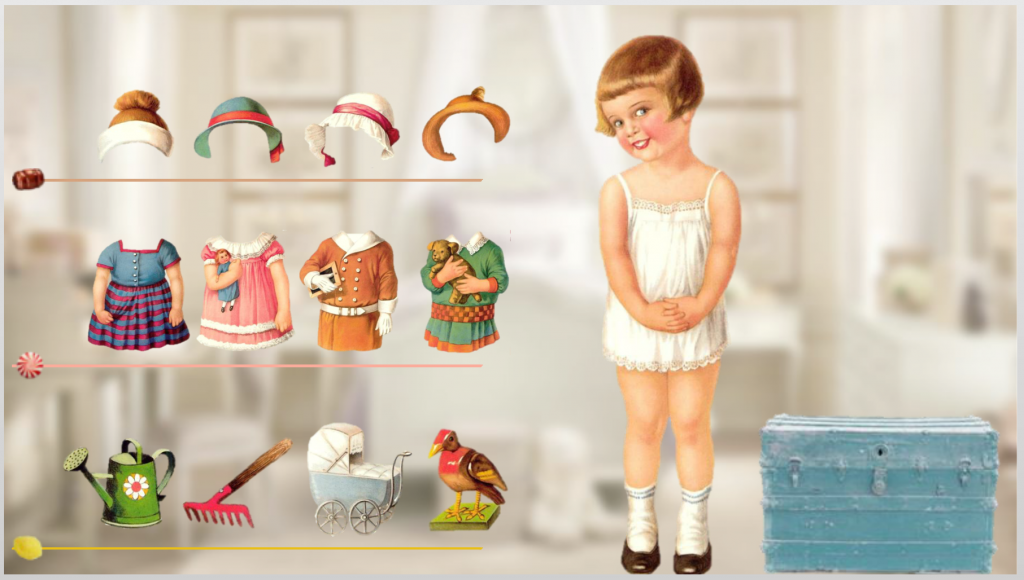
I went with vintage paper doll images I found, then got busy removing the background and cutting them apart in PowerPoint.

To set the scene I used a modern house with vintage style. The interior background is a girl’s bedroom. Vintage candy shapes (root beer barrels, peppermints, and lemon drops) on the sliders also set the tone.

Three Sliders

Three Sliders

Slider Design Steps

I created three sliders – one each for hats, outfits, and toys – all engineered the same way. This is how I did it in 8 pretty simple steps:

1. Added the slider: Insert > Controls > Slider. I chose the slimmest track style.

2. Added candy images to the thumb: Right click on the thumb > Format Shape > Picture or Texture Fill, then choose your image. The images will come in very small, but before clicking on anything else select Format > Size and increase the height and width as needed.

3. Formatted the tracks: With the slider selected, go to Slider Tools > Format and choose colors for your track fill and track border, then adjust the colors on your slider track hover states, if needed.

slider formatting

Slider Setup

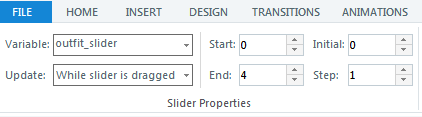
4. Set up the controls: With the slider selected, go to Slider Tools > Design. Here I renamed the default variable to “outfit_slider” and selected my preferred Update style. I wanted 5 slider positions: 0, 1, 2, 3, and 4 – which is why my Start selection says 0 and End says 4. The candy thumb is at the default position of 0, outfit one is at position 1, etc., and you progress between them in increments of 1 as indicated in the Step field.

5. Added slider images, states, and animation: I gave each image a state called Chosen, and for that state added the additional images I wanted to appear on the right, such as a dress on the little girl. I also added entrance and exit animations for those images on the Chosen state.

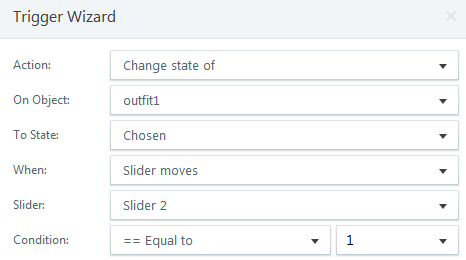
Trigger One: Display Chosen State

Trigger One: Display Chosen State

.

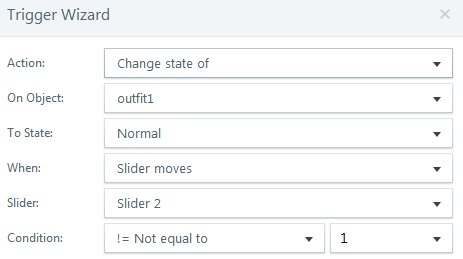
Trigger Two: Return to Normal State

Trigger Two: Return to Normal State

.

6. Added slider triggers: For each slider item I created two triggers. One to display the Chosen state at the position I wanted it to appear, and one to return it to its Normal state.

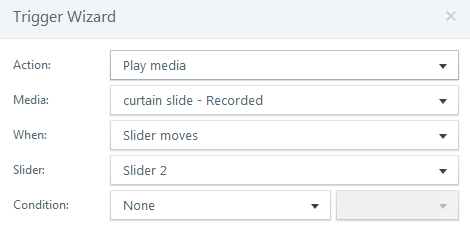
Trigger for Sliding Sound Effect

Trigger for Sliding Sound Effect

.

7. Added a sliding sound effect: I wanted a sliding sound as you move between each item on the slider, so I added the audio file and created one trigger per slider.

Trigger for Incidental Sound Effects

Trigger for Incidental Sound Effects

.

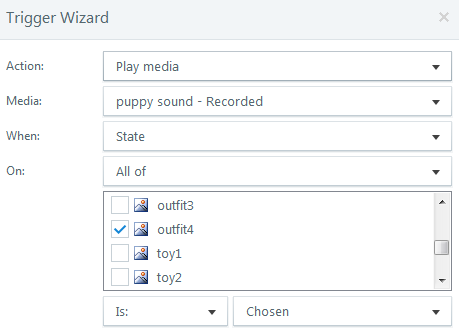
8. Added incidental sound effects: For the puppy sound, for example, I simply added a trigger that fires when the state of that image is Chosen.

Time to Play!

If you’d like to put together a few nice outfits, have your audio ready and try the demo right here.

Select Image to Launch Demo
Select Image to Launch Demo
Filed Under: E-Learning, Front Slider Tagged With: Articulate Storyline, Audio, Community, E-Learning Design, ELHChallenge, Emotional Engagement, Show Your Work

  • « Go to Previous Page
  • Go to page 1
  • Go to page 2
  • Go to page 3
  • Go to page 4
  • Go to page 5
  • Go to page 6
  • Interim pages omitted …
  • Go to page 8
  • Go to Next Page »

Primary Sidebar

Welcome!

I’m an award-winning instructional designer and proud Articulate Super Hero who creates e-learning for large organizations. I blog to explain my design process, share tips and tricks, and help others succeed. I hope you enjoy my refreshing gallery of e-learning goodness!

  • View jackietrains’s profile on Instagram
  • View jackievannice’s profile on LinkedIn

Tags

Articulate 360 Articulate Rise Articulate Storyline Articulate Studio Audio Avatars CCAF Characters Community Context Design Makeover Dials Drag & Drop E-Learning Design ELHChallenge Emotional Engagement Free Download Freelancing Games German Glossary Instructional Design Languages Makeover Menu Mobile Motivation Pantone Portfolio PowerPoint Professional Development Quick Reference Quizzes Sales Training Scenarios Show Your Work Software Training Storyline 360 Tables Technical Training Templates Typography Video Visual Design Voiceover

Top Posts & Pages

  • Portfolio
    Portfolio
  • Home
    Home
  • Sexual Harassment Training
    Sexual Harassment Training
  • Sales Mobility Software Training
    Sales Mobility Software Training
  • Navigating a Tasty Circular Menu
    Navigating a Tasty Circular Menu
  • Articulate's E-Learning Heroes Challenges
    Articulate's E-Learning Heroes Challenges
  • About
    About
  • Free Visual Storyboard Template
    Free Visual Storyboard Template
  • Free Storyline Templates
    Free Storyline Templates
  • How to Go Full-Screen & Lose the Player in Storyline
    How to Go Full-Screen & Lose the Player in Storyline

Copyright © 2026 Jackie Van Nice and E-Learning Goodness by Jackie Van Nice