• Skip to primary navigation
  • Skip to main content
  • Skip to primary sidebar

Jackie Van Nice

E-Learning Goodness by Jackie Van Nice

  • Home
  • About
  • Blog
  • Portfolio
    • Articulate’s ELH Challenges
    • Sales Mobility Software
    • Product Sales
    • Sexual Harassment
    • Code of Conduct
  • Freebies
    • Free Storyline Templates
    • Free PowerPoint Templates
    • Free Images
    • Freelancing Tips
    • Free Resources to Help Get Started in eLearning
  • Work With Me
  • Contact

ELHChallenge

My Multidimensional (Yet Flat) Desk

September 17, 2014 By Jackie Van Nice 16 Comments

Select Image to Launch Demo

Select Image to Launch Demo

This week’s Articulate challenge is to render your work space in simple flat-style images.

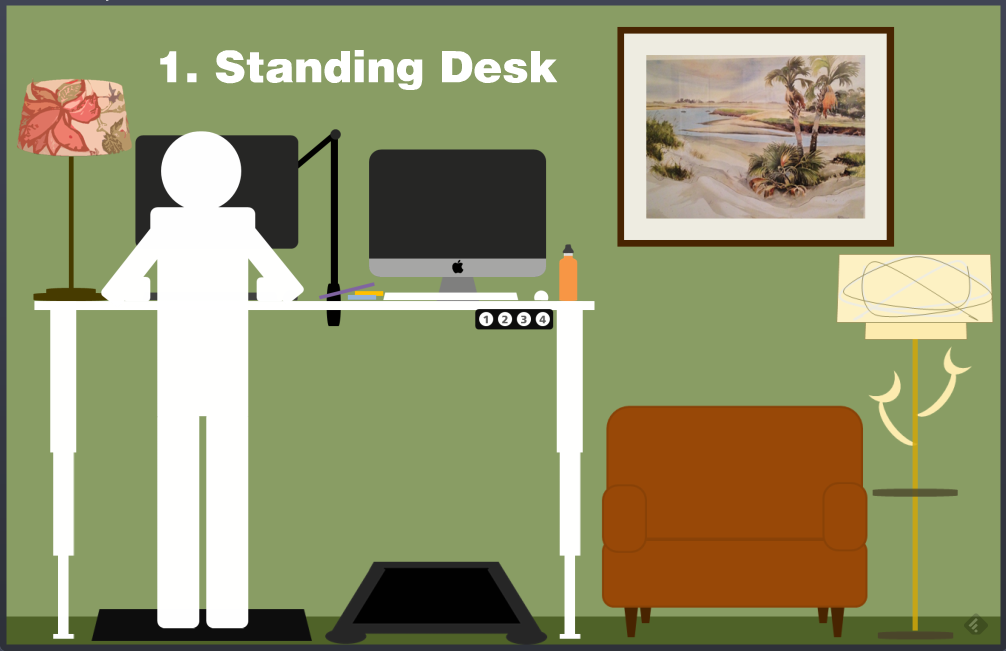
Oddly enough, it coincides with my move from a standard desk to a standing/walking/kneeling/sitting desk, so that’s what I illustrated in my entry.

The Problem and The Solution

I’d never seriously thought about doing this before, but I happened to glimpse an article on Facebook that was talking about standing desks. (Here’s the article. It has lots of good info including both high-end and very simple, inexpensive options.)

If you know me even a little bit, you’ve gathered I spend an insane amount of ’round-the-clock time at my desk. Leaving the house to move involves a 40 to 60 minute round-trip drive (more sitting) to go somewhere I can bike, take a walk, or go to a gym. When you’re in the middle of work you love, that’s a big disincentive to take a break.
The Walking Desk

The Walking Desk

When I lived in Chicago and Portland I could roll out my front door every day and walk for miles or go to a nearby gym. In Europe I’d go for walks or run errands on foot every day and it was fantastic. Where I am now makes me insane and my body is going to stop speaking to me completely if I don’t do something.

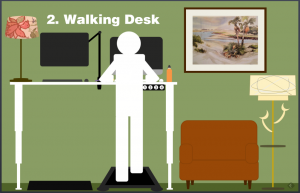
So the standing desk idea resonated with me, and once I delved into the topic I realized that making it into a walking desk (plus a kneeling desk), and a sitting desk were just what the doctor would order if I made it to the doctor before I gave out completely.

The Images and Interaction
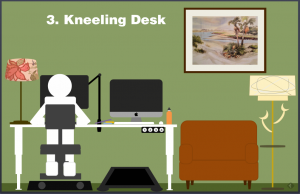
The Kneeling Desk

The Kneeling Desk

Some of the pieces and parts of my new setup are still in transit, so I rendered the scene as I expect it to be. Much of it is already in place, so those things are pretty spot-on.

Since the whole scheme hinges on the desk raising and lowering to specific heights, that’s what I focused on in the interaction. I put in a flat person to illustrate, but also animate them out so you can just see the room. All you do to morph the desk is push a button to move it to a preset height, so that’s what I have the user do in the demo. It’s quick and simple to illustrate the concept.

Try It! (+ My Setup Details)
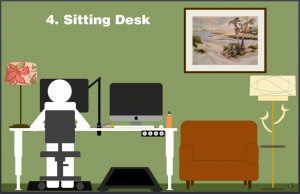
Select Image to Launch Demo

Select Image to Launch Demo

Here’s the quick interaction if you’d like to see it. Also, since some people have asked for the details of my setup, I’ve shared them below.

Desk: I chose the UpLiftDesk 900, 80″ wide – enough to accommodate both a treadmill and sitting/standing station below; though 72″ wide might be enough. Unlike other desks, you can decide when you put it together how far apart you want the legs. I chose the white top and white base to go with my other office furniture.

This desk had good reviews for its smooth lift motors, which are housed inside of the legs, and sturdiness. I believe there are four presets you can customize for different heights.

I didn’t choose to go with a keyboard tray for now, but if you want one on a regular full-sized slide you can get the 920 desk model instead. I thought the 900 might be a bit sturdier and knew I could use a half-track keyboard tray with it if I really wanted to.

I also chose the 12-year extended warranty. The last thing I want to figure out 10 years from now is where and how to get the motors in my desk legs repaired!

Treadmill: I chose the LifeSpan TR1200-DT3 Under Desk Treadmill. Seems to be the go-to choice. Several desk companies, including UpLiftDesk, sell this same treadmill for the same price if you want to buy from them – but all of the advice I found said to order from LifeSpan directly for ease of dealing with any warranty issues, etc. I went with the extended warranty on this, too.

Standing/Sitting Mat: I chose the UpLift Sit-Stand Desk Mat (an option you can choose when you order the desk) in the 3′ x 5′ size so it’s large enough to place a chair on it.

Monitor Arm: Since you want your monitors to swing to whichever side of the desk you’re working on you probably want them on arms like this. I went with the UpLift Single Monitor Arm (an option you can choose when you order the desk) for my regular monitor, but I’m hesitant to be swinging my iMac around on an arm! (Plus I’d have to find one that fits.) It’s just as easy for me to slide the iMac over from one side to the other, so that’s my plan for now.

Kneeling Chair: I already have the Jobri Jazzy Kneeling Chair; though I got it a few years ago and offhand don’t remember who I ordered it from. I like switching off between it and my regular office chair.

Regular Office Chair: I’ll give a shout-out to my chair since I’ve used it incessantly for an unbelievable 17 years now. It’s put up with lots of grief and it’s still a complete champ. I believe it’s Via’s Terra Low-Back chair. I bought it at a furniture store in Portland and they let me customize the fabric.

More Info & Videos: I think that’s it for my setup – but the UpLift site has some nice videos to give you a better look at how all of this works together, plus a whole lot more.

Let me know if you decide to revamp your desk in a similar way. I’d love to hear about it!
Filed Under: E-Learning, Working for Yourself Tagged With: Articulate Storyline, Community, E-Learning Design, ELHChallenge, Freelancing, Professional Development, Show Your Work, Visual Design

And the Winner Is…

September 10, 2014 By Jackie Van Nice 22 Comments

Click to Visit the First-Year Wrap-Up --- (Image: David Anderson)

Click to Visit the First-Year Wrap-Up — (Image: David Anderson)

The first year of Articulate’s E-Learning Heroes challenges has just wrapped up, and David Anderson asked us to nominate our fellow challengees for their achievements. Since that feels nearly impossible (if I nominate one person for “most humorous” I’m leaving out 20 others who were hilarious) – I’m going to focus on the participants I most appreciated and why.

Most Appreciated

Though I may be forgetting some, here’s my best shot:

Richard Watson: Richard joined us when the challenge was to create a game using my German drinking game template, so I had to like him from the start. Since then he has created a diverse and inspiring body of challenges that I admire. I always learn from him and I’m inspired by everything he produces. He’s also endlessly supportive, encouraging, and the first guy to ever put my picture on the side of a semi. Thanks Richard!

Nick Russell: Not only is Nick unfailingly supportive, but his work leaves me speechless. Once I regain my senses after seeing it I’m always stammering “How did he DO that??” Though I can only aspire to reach his level of creativity, design, technical expertise, and hilarity – I’m incredibly grateful that he’s there to inspire and encourage me and everyone else. Thank you so much, Nick.

Daniel Adeboye: Though Daniel is new to e-learning design and is currently limited to developing in PowerPoint, he fearlessly plunged himself into the challenges and instantly became an inspiration. His innovation, unfailing willingness to learn, and unflagging support and encouragement makes him a pretty great fellow challenge participant. Thank you, Daniel!

Dan Sweigert: Dan is another fearless inspiration. Whether trotting out imaginary friends or creating the most extraordinary games, he has a vision and he makes it happen. Combine that determination with his natural creativity, humor, and musical gifts and you have quite the challenge powerhouse. Thanks for everything, Dan!

Matt Guyan: Matt always comes up with fresh approaches to challenges I would never have thought of, and he shows me new things I can learn every time. His curiosity, enthusiasm, and unfailing support and encouragement are refreshing and always welcome. Thank you, Matt!

Gerard Friel: Though new to the challenges, Gerard is one of the people who encouraged me as I worked my way through the older ones. It’s a lonely road back there, and he was always kind and generous – PLUS I love his remarkable work and can’t wait to see much more from him in the challenges. Thank you, Gerard!

Charles Hamper: Charles’ entries always make me want to spend the day trying to somehow imitate the fantastic animations he’s created. They’re unfailingly elegant and look completely effortless. The fact that he then shares his secrets with us is pretty amazing. Thank you so much, Charles!

Gemma Henderson: To say Gemma has a flair for creative design and imagery is an understatement. You never know what she’ll come up with next, but you know it will be funny, beautiful, and/or strange (in the best possible way). Her work is an inspiration. Thanks, Gemma!

Ashley Chiasson: You can always count on Ashley to come up with an entry that is beautifully done, and that may or may not include a cat or duvet cover. She’s creative, clever, and always supportive of her fellow challengees. Thank you so much, Ashley!

Jeff Kortenbosch: Having now visited the farthest reaches of the challenge archives, I know that Jeff has been a dedicated and enthusiastic challenge participant throughout. His contributions have not been just his terrific work, but also his encouragement and support of others and of the challenges themselves. Thank you, Jeff!

Bruce Graham: When Bruce is able to fit a challenge into his schedule, it’s worth the wait. It’s also ironic that he’s a guy who knows good e-learning; yet his challenge entry that always makes me happy is his example of rotten e-learning. Thanks, Bruce!

Paul Alders: Paul always has terrific ideas and creates challenge entries I can learn from. He’s also enthusiastic and supportive when it comes to the challenges and his fellow participants, and somehow he brings a breath of fresh air to the proceedings. Thank you, Paul!

Montse Anderson: Montse’s technical precision and beautiful designs are always an inspiration. If ever I get organized enough to start including my color palettes with my posts (just one example of the meticulous care she takes with her designs), it will be because of her stellar example. Thank you, Montse!

Allison Nederveld: Allison’s refreshing style and carefully crafted entries are always inspiring. She’s generous with her knowledge – and her templates! – and is a wonderful fellow challenge participant. Thank you, Allison!

Dianne Hope: Dianne’s work is always surprising. Whether she’s exploring making coffee, instructional design theory, or the Outback – she has a fresh approach and beautiful style. She’s also unfailingly supportive and encouraging and it’s a pleasure to be in the challenges with her. Thank you, Dianne!

Nancy Woinoski: Nancy’s entries are invariably beautiful, creative, innovative, and often funny. They always inspire me to push myself to do more, and for that I am truly grateful. Thank you, Nancy!

Becky Fleisch Cordeiro: Whenever Becky gets a chance to create an entry, I always learn from it. She uses her expertise to come up with entries that are innovative and intriguing – plus she’s terrific at helping and encouraging the rest of us. Thank you so much, Becky!

Who’s The Winner?

As painfully obvious as this is – the winner is me and every other person who has participated. I win because I get to grow in my work and as a member of a community with people like these who are unfailing in their helpfulness and generosity. I also get to have fun creating the silliest things and having all of these nice people (and many others) be kind enough to not only look at them, but to be supportive and encouraging to create even more. Without them, and without David Anderson’s leadership, I’d never in a million years have thought of making a German drinking game or Kid vs. Cop spelling bee or a lyrical and romantic approach to filling out a passport application.

Thank You!

So a HUGE “thank you” to all of you who participated and (equally importantly!) supported and encouraged all of the challenge participants. I’m excited to see what this new year of challenges (and new challenge participants) will bring!

Filed Under: E-Learning Tagged With: Community, ELHChallenge, Professional Development

Ker-thwack! Fighting Harassment Comic Book Style

August 26, 2014 By Jackie Van Nice 5 Comments

Select Image to Launch Demo

Select Image to Launch Demo

I’m so excited! Today I completed the entire first year of Articulate’s E-Learning Heroes challenges – all 48 of them! I started participating about 5 months into the challenge year so there were a lot to make up, but I did it. Before collapsing I’ll share one of my favorites I uncovered back at #11: Comic Style Themes for E-Learning.

Figuring Out the Style

I don’t know much about comic books and didn’t have a clue how to handle this challenge, but figured it out the same way I did the interactive resume one. I searched for comic books on Pinterest, pinned a couple of things, then took in the rest. That made it easy to assess the approach and style and I got the gist very quickly.

How About Harassment?

I thought about courses I’ve done that I could adapt, and harassment seemed like just the ticket. I already had the material and characters in place; I just needed to change the style and ramp up the drama.

Colors & Fonts

The color palette came from the outfits of the characters on the cover. Add in the classic yellow box for narration, and you’re all set. The fonts were free from Dafont: That great title font is Feast of Flesh BB and the paragraph font is Comic Book.

fonts

Comic Book Fonts

Before & After

Here are a couple of screens from this harassment course I did a few years back. You can see how I adapted them to the comic book demo. You can also see that the comic book style gave me an acceptable way to make it more personal and cut to the chase more quickly and with greater emotional impact.

"Before" Screen

“Before” Screen

"Before" Screen

“Before” Screen

"After" Screen

“After” Screen

Next Time

Given more time I’d have loved to add in music, sound effects, and background images; but as a quick learning exercise I’m pretty happy with it. Fortunately David Anderson promises he’ll have another comic book challenge coming up in the new challenge year. (Ka-zam!!!)

Here it Is!

If you’d like to check out this quick comic-book style demo, it’s right here.

Filed Under: E-Learning Tagged With: Articulate Storyline, Characters, Community, Context, E-Learning Design, ELHChallenge, Emotional Engagement, Show Your Work, Visual Design

The Challenge of Storyboarding (+ Free Template!)

August 24, 2014 By Jackie Van Nice 12 Comments

Visual Storyboard Template

Visual Storyboard Template

This week’s Articulate challenge is to show how you storyboard and to share some of your favorite tips.

Visit this Storyboard’s download page if you’d like to try it!

How I Storyboard

Most of the Time: Prototype

I normally create a quick prototype in Storyline to communicate my design. You can document what you’d like the user experience to be all day long in a written storyboard, but it never conveys the end result as effectively as a demo.

Some of the Time: Visual Storyboard (Try Out The Template!)

Sometimes I’ll do a visual storyboard in PowerPoint, which works pretty well and most SMEs seem to like working with it.

Almost Never: Text-Only Storyboard

I’ll receive text-only storyboards from clients as a way to give me their basic content, but I don’t spend time creating them myself.

My Storyboarding Tips

  1. Communicate your ideas in the clearest way possible. For me this usually means spending time creating a working prototype rather than documenting how I’d like to build something.
  2. Storyboarding Course on Lynda.com

    Storyboarding Course on Lynda.com

    If you’d like an overview of the different types of storyboards and how to use them, you might want to check out Articulate Super Hero Daniel Brigham’s course on Lynda.com.

  3. Storyboarding Resources on E-Learning Heroes Site

    Storyboarding Resources on E-Learning Heroes Site

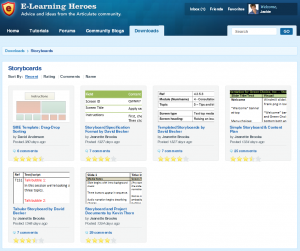
    If you’re looking for some free storyboard templates, the Downloads section of Articulate’s E-Learning Heroes site might have what you need.

Happy storyboarding!

Filed Under: E-Learning Tagged With: Community, E-Learning Design, ELHChallenge, Free Download, PowerPoint, Templates

Meaningful Comparisons in Action

August 23, 2014 By Jackie Van Nice 6 Comments

Select Image to Launch Demo

Select Image to Launch Demo

Since this week marks the end of the first full year of Articulate’s weekly challenges, I decided to go back to complete all of the ones I’d missed – and there were a lot. I still have two more to complete (almost there!) but yesterday I swung back to Challenge #1: How Would You Show Meaningful Comparisons?

Note the Maps of the US and Germany

Note the Maps of the US and Germany

Getting Things Into Perspective

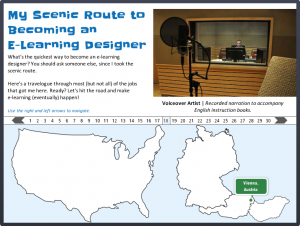
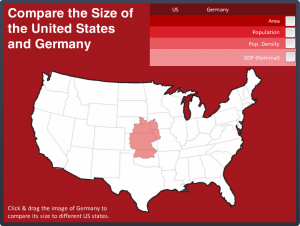
In my earlier “virtual tour” challenge I showed maps of the US and Germany next to one another to show the places I’ve worked. They weren’t meant to be at the correct scale – but every time I look at that piece I snicker at how far off it is. So I decided to do a demo to show a size comparison.

Two Countries; One Monochromatic Scheme

My US-German Palette

My US-German Palette

Two reasons for the red palette: The flag of Germany and the flag of the US. Their only common color is red. What’s interesting is how different the reds are. So I created a palette that includes both of them in an intentional way.
The other reason I wanted to do this was because I’d just completed yet another older challenge using Pantone’s current color of the year and used a monochromatic scheme for that one, too. I liked it enough to try the approach again here.

My Monochromatic Pantone Design

My Monochromatic Pantone Design

What a Drag it is to Compare

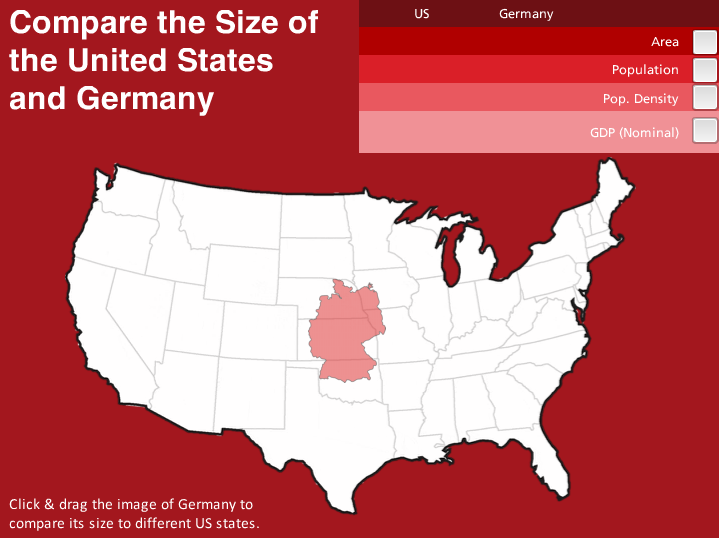
The idea is that you simply click on the map of Germany and drag it to different US states to compare its size. Is it effective? You can take a look at the difference between this and the maps I showed in my virtual tour (see images above) and decide.

My truly brilliant fellow challenge participant Nick Russell suggested that it would be great to have comparative data for each US state come up as you drag the map of Germany over it. It would be, but that’s going to have to wait until I’ve added quite a few more hours to each day and quite a few more days to each week. But it’s a fantastic idea, Nick!

Select Image to Launch Demo

Select Image to Launch Demo

Enjoy it Here + There’s More on the Way!

Here’s my comparative demo if you’d like to mess around with it. My goal is to complete the whole first-year set of challenges within the next week. With only two to go I’m in good shape – and I’ll keep you posted!

Filed Under: E-Learning Tagged With: Articulate Storyline, Community, E-Learning Design, ELHChallenge, German, Pantone, Show Your Work, Visual Design

  • « Go to Previous Page
  • Go to page 1
  • Interim pages omitted …
  • Go to page 14
  • Go to page 15
  • Go to page 16
  • Go to page 17
  • Go to page 18
  • Interim pages omitted …
  • Go to page 23
  • Go to Next Page »

Primary Sidebar

Welcome!

I’m an award-winning instructional designer and proud Articulate Super Hero who creates e-learning for large organizations. I blog to explain my design process, share tips and tricks, and help others succeed. I hope you enjoy my refreshing gallery of e-learning goodness!

  • View jackietrains’s profile on Instagram
  • View jackievannice’s profile on LinkedIn

Tags

Articulate 360 Articulate Rise Articulate Storyline Articulate Studio Audio Avatars CCAF Characters Community Context Design Makeover Dials Drag & Drop E-Learning Design ELHChallenge Emotional Engagement Free Download Freelancing Games German Glossary Instructional Design Languages Makeover Menu Mobile Motivation Pantone Portfolio PowerPoint Professional Development Quick Reference Quizzes Sales Training Scenarios Show Your Work Software Training Storyline 360 Tables Technical Training Templates Typography Video Visual Design Voiceover

Top Posts & Pages

  • Portfolio
    Portfolio
  • Home
    Home
  • Sexual Harassment Training
    Sexual Harassment Training
  • Sales Mobility Software Training
    Sales Mobility Software Training
  • Navigating a Tasty Circular Menu
    Navigating a Tasty Circular Menu
  • Articulate's E-Learning Heroes Challenges
    Articulate's E-Learning Heroes Challenges
  • About
    About
  • Free Visual Storyboard Template
    Free Visual Storyboard Template
  • Free Storyline Templates
    Free Storyline Templates
  • How to Go Full-Screen & Lose the Player in Storyline
    How to Go Full-Screen & Lose the Player in Storyline

Copyright © 2026 Jackie Van Nice and E-Learning Goodness by Jackie Van Nice